



Starlink Mini 12V/24V Car Charger with USB-C - 30V 2A

Check the selected Tesla model, model year, and option before checkout. If this product has a Car Model or Compatible Model selector, choose the option that matches your vehicle.
- Use the product images and variant name to confirm the correct version.
- If you are unsure about fitment, contact Tesstudio with your Tesla model and production year before ordering.
Tesstudio installation support is available for Tesla owners who need help choosing, installing, or troubleshooting accessories.
Most Tesstudio accessories are designed for straightforward DIY installation. For powered upgrades, wiring, lighting, or large exterior parts, professional installation may be recommended.
Local installation and technical support
- Address: 14761 Franklin Ave # G, Tustin, CA 92780
- Technical support: +1 (657) 543-9876 or +1 (657) 565-1007
- Support hours: Monday-Friday, 8:30 AM-5:30 PM
The phone numbers above are for technical installation support only. For orders, shipping, returns, or general customer service, contact:
- Email: support@tesstudio.com
- WhatsApp: +1 714 317 9647
Tesstudio checks fit, material, and daily-use durability before listing products for Tesla owners.
- Eligible products include warranty support for non-human damage issues.
- If a product arrives damaged or does not fit as expected, keep the packaging and contact us with photos so we can help quickly.
In-stock items are usually processed within 1-2 business days. Delivery time depends on destination, product size, and stock status.
- Orders over $99 qualify for free standard shipping where available.
- Oversized, remote-area, pre-order, and special-market items follow the terms shown on the product page.
- Tracking is provided after dispatch.
Need help before or after purchase?
Contact Tesstudio support:
WhatsApp
+1 714 317 9647
Choisir les options
Power Starlink Mini and Keep a USB-C Charging Port Ready in the Vehicle
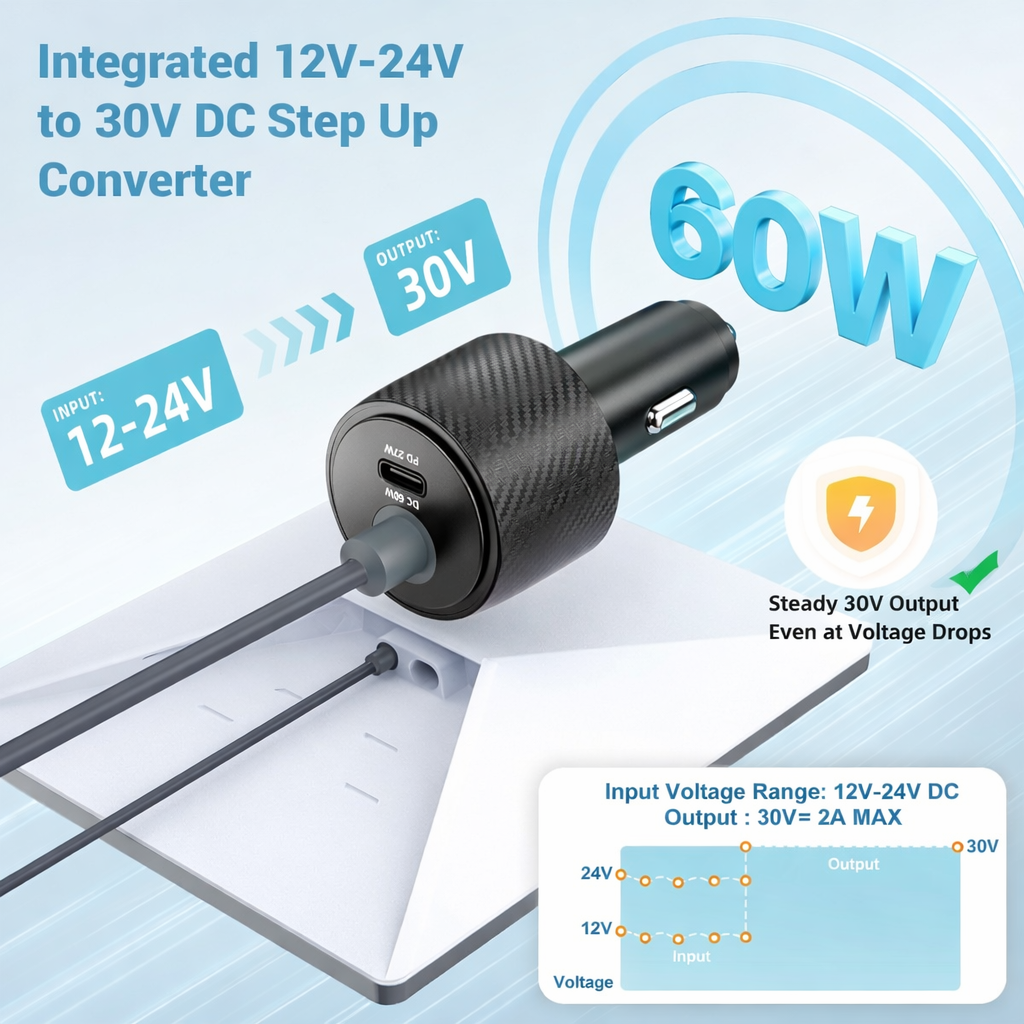
A compact 12V–24V vehicle adapter with an integrated step-up converter for Starlink Mini. The dedicated DC output supplies regulated 30V / 2A power to a compatible Mini cable, while the auxiliary USB-C port can charge another compatible device.

Replace the Separate Converter and Socket Adapter With One Compact Unit
More Adapters Create More Connections to Manage
A mobile Starlink Mini setup can involve a vehicle plug, separate voltage converter, additional charging adapter and multiple cable connections around the cabin.
12–24V Input, 30V Mini Output and USB-C in One Body
The converter electronics sit directly inside the cigarette-lighter adapter, creating a cleaner power path from the vehicle socket to Starlink Mini.
One Small Adapter Solves Two Vehicle-Power Jobs
30V / 2A Mini Output
Provides a dedicated regulated 60W DC output for a compatible Starlink Mini power cable.
12–24V Input
Designed for compatible 12V cars and 24V truck or RV electrical systems.
USB-C Charging
Adds a second output for charging compatible phones and other USB-C devices.
Compact Plug-In Design
No separate boost-converter box is required between the vehicle outlet and adapter.
Step Vehicle Voltage Up Before It Reaches Starlink Mini
The current product design integrates the conversion electronics directly into the car adapter body. A compatible 12–24V vehicle source is converted to the regulated 30V output used by the DC port.
- 12–24V DC vehicle input
- Regulated 30V DC output
- 2A maximum DC output shown
- 60W dedicated DC output capacity
Dedicated Starlink Mini Power Plus an Auxiliary USB-C Port
Keep the two outputs separate in your setup: the 30V DC port is the Starlink Mini power path, while USB-C is intended for a compatible secondary device.
Starlink Mini on DC. Your Secondary Device on USB-C.
Connect a compatible Starlink Mini DC cable to the dedicated round power port. This is the output intended to power the Mini.
The adapter face is marked PD 27W. Current product media also shows USB-C profiles of 5V/3A, 9V/3A and 12V/2.5A. Connected-device charging depends on the negotiated profile.

Keep Starlink Mini Online Without Giving Up the Vehicle's Charging Port
Because USB-C is integrated into the adapter, you can retain an auxiliary charging point for a compatible phone or other small device while the main DC output is used for Starlink Mini.
- Dedicated 30V Mini power output
- Separate USB-C charging connection
- Useful when the vehicle has limited accessory sockets
- Vehicle socket must support the combined electrical load

The Plug May Fit — but the Vehicle Socket Still Needs Enough Power
Use only with a compatible accessory socket operating within the adapter's listed 12–24V DC range.
The socket, fuse and vehicle wiring must support the Starlink Mini load plus any USB-C device used at the same time.
A loose or worn accessory socket can create resistance, voltage drop and excessive heat.
Its boost electronics convert compatible input voltage to 30V. If the source socket cannot supply enough continuous input power, Starlink Mini may become unstable or the plug/socket may overheat.
Built-In Protection Around the Vehicle Power Conversion Circuit
Current product media lists protection against short-circuit conditions in the adapter electronics.
Current imagery also identifies internal over-current protection for the converter.
Protection circuitry is shown for abnormal voltage conditions within the adapter system.
The conversion and protection circuitry are contained inside the compact adapter housing.

Designed for the Temperature Changes Mobile Equipment Can See
Current product media lists an operating-temperature range of approximately -20°C to 60°C for the adapter. Actual vehicle cabins can exceed normal electronics limits, especially when parked in direct summer sun.
- Listed range: -20°C to 60°C
- Allow ventilation around the adapter body
- Do not cover the adapter while heavily loaded
- Disconnect if the plug or housing becomes abnormally hot

The 30V Output Is Intended for Starlink Mini
The current compatibility graphic identifies Mini as the supported Starlink terminal and marks larger Starlink generations as incompatible with this power adapter.
Compatible terminal shown in the current product media.
Different power and connector architecture.
Uses a different power system from Starlink Mini.
Different hardware and substantially different power requirements.

One Adapter for Cars, Trucks, RVs and Protected Marine Cabins
Add regulated Mini power without installing a permanent battery-side converter.
Use an existing compatible accessory socket for a temporary travel-internet setup.
Compatible 24V accessory sockets can fall within the adapter's listed input range.
Suitable only where a protected compatible 12–24V accessory socket is available.
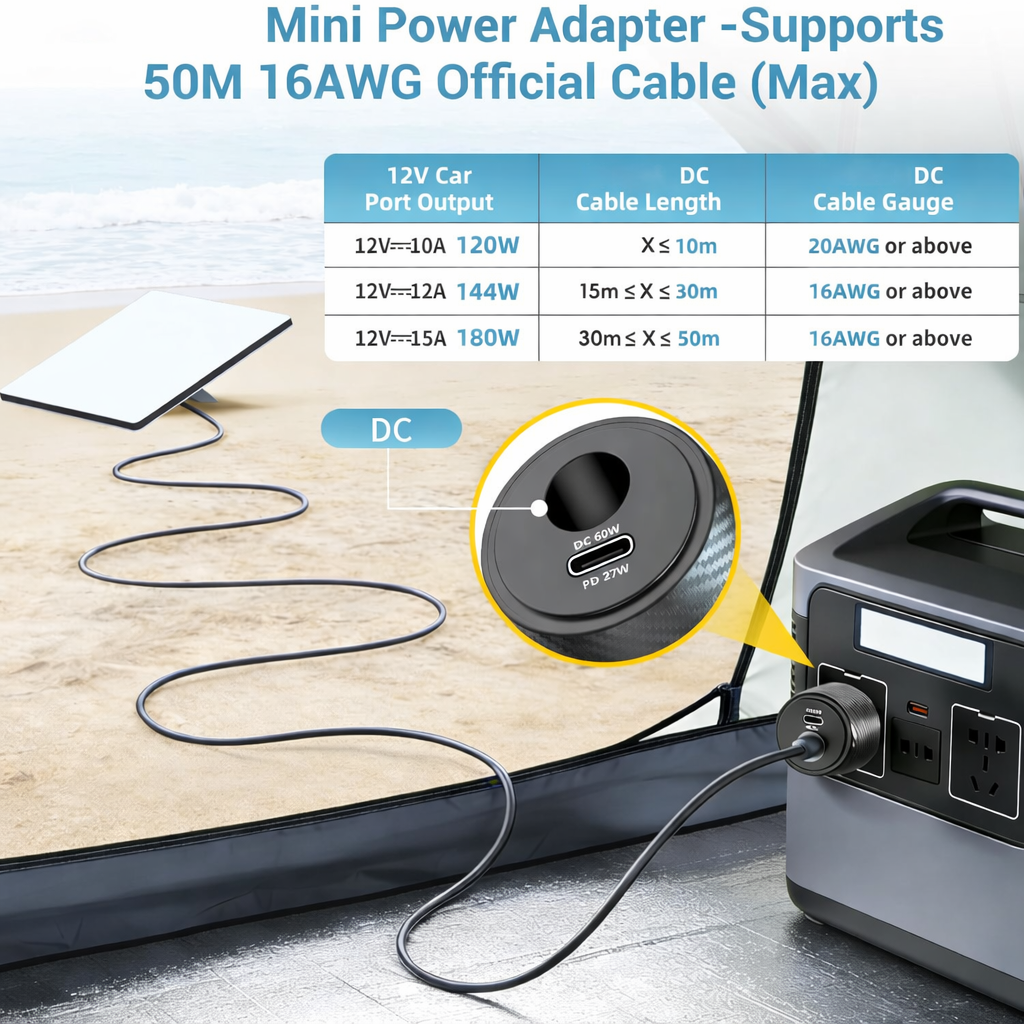
Cable Length, Wire Gauge and Vehicle Socket Capacity All Matter
Long power runs increase electrical resistance, so conductor size becomes more important as distance increases.
A long cable cannot compensate for a vehicle socket that is already operating near its power limit.
Match cable gauge and length to the intended load instead of relying only on connector compatibility.
Treat those figures as installation guidance rather than a universal performance guarantee. Vehicle socket capability, connector quality, actual cable resistance and operating load all affect final results.
Vehicle Socket → Converter → Mini Cable → Starlink Mini
The adapter itself does not replace the physical cable between the vehicle area and Starlink Mini. Connect a compatible Mini DC power cable to the adapter's 30V output port.
Check the Vehicle Socket
Confirm 12–24V DC operation and enough continuous power for the planned load.
Insert the Adapter
Push the car adapter fully into the compatible accessory socket.
Connect the Mini Cable
Attach a compatible Starlink Mini DC cable to the 30V / 2A output port.
Power Up & Monitor
Confirm normal Mini startup and check the adapter and socket for unusual heat.
Keep the Adapter Cool, Fully Seated and Clear of Driving Controls
Mobile power accessories depend on the vehicle socket, cable route and connection quality as much as the adapter itself.
Stop using the adapter if the plug, socket or housing becomes unusually hot or discolored.
Keep cables away from pedals, steering controls, seat rails, door latches and other moving parts.
Do not expose the vehicle accessory socket or open electrical ports to standing water.
Complete the Starlink Mini Travel Power Setup
Three complementary Tesstudio products for AC power, portable battery power and vehicle mounting.
Starlink Mini 12V / 24V Car Adapter Questions
Which Starlink model is this adapter designed for?
This adapter is designed for compatible Starlink Mini power setups. Current product imagery marks Standard Gen 2, Standard Gen 3 and Flat High Performance as incompatible.
What input voltage does the adapter support?
Current product media lists a 12–24V DC vehicle input range.
What does the DC output provide?
The dedicated DC port is listed at 30V / 2A maximum, or 60W.
Why does the adapter convert vehicle power to 30V?
The integrated boost circuit converts compatible 12–24V vehicle power to a regulated 30V output, giving Starlink Mini a higher-voltage DC supply.
Is 30V compatible with Starlink Mini?
Starlink publishes a broad DC input range for Mini, and 30V falls within that range. This product remains an aftermarket third-party adapter.
Does the adapter include a Starlink Mini power cable?
The adapter provides the 30V DC output connection. Confirm the package contents of your order and whether you already have the compatible Mini DC cable needed between the adapter and Starlink Mini.
What is the USB-C port used for?
The USB-C port is an auxiliary charging output for compatible phones and other USB-C devices. It is separate from the 30V DC Starlink Mini output.
How powerful is the USB-C port?
The adapter face is marked PD 27W. Current product media also shows output profiles of 5V/3A, 9V/3A and 12V/2.5A. Actual charging power depends on the connected device and the negotiated USB-C profile.
Why does one product image show 30W while the adapter says PD 27W?
Current media shows a 12V/2.5A USB-C profile, which mathematically equals 30W, while the adapter face is labeled PD 27W. Because charging depends on the negotiated profile, use the connected-device specification rather than assuming one fixed USB-C wattage for every device.
Can I power Starlink Mini from the USB-C port?
Use the dedicated 30V / 2A DC output for Starlink Mini. The auxiliary USB-C port is intended for compatible secondary charging devices.
Can I power Starlink Mini and charge a phone at the same time?
Current product media shows simultaneous DC and USB-C use. The vehicle socket and electrical circuit must have enough continuous capacity for the combined load.
Will it work in every 12V car socket?
Not necessarily. The socket must remain within the supported voltage range and provide enough continuous power. Worn contacts, low fuse ratings or undersized vehicle wiring can affect performance.
Can I use it in a 24V truck or RV?
A compatible 24V accessory socket falls within the adapter's listed 12–24V input range. Confirm the actual outlet specification before use.
Can I use it with a 36V or 48V vehicle source?
No. The current product input range is listed as 12–24V DC. Do not connect it directly to a source above the specified input range.
What operating temperature is listed?
Current product media lists approximately -20°C to 60°C operating temperature. Avoid using the adapter when the vehicle interior exceeds the product's rated conditions.
Does it have electrical protection?
Current product imagery lists protection functions including short-circuit, over-current and over-voltage protection within the converter circuitry.
Can it support a long Starlink Mini cable?
Current product media includes guidance for longer cable runs when the vehicle socket has adequate power and the conductor gauge is appropriate. Longer cables create more resistance, so source capacity, wire gauge and connector quality all become increasingly important.
Why is Starlink Mini restarting when connected to the adapter?
Check the vehicle socket voltage under load, socket power rating, plug temperature, Mini cable condition and connector seating. A weak or loose vehicle socket can cause voltage drop under load.
What should I do if the car plug becomes hot?
Disconnect it and inspect the vehicle socket. Excessive heat can indicate poor contact, oxidation, an overloaded circuit or a damaged accessory socket.
Can I leave the adapter plugged in all the time?
Vehicle accessory sockets behave differently when parked. Some stay powered even when the vehicle is off. Disconnect the adapter when it is not needed if continuous power could discharge the vehicle battery.
Is this an official Starlink product?
No. This is an aftermarket accessory intended for compatible Starlink Mini power setups and is not manufactured or endorsed by Starlink.
Is Starlink Mini, phone or vehicle included?
No. Starlink Mini, phones, laptops, vehicles, power stations and other lifestyle equipment shown in the product imagery are for demonstration only. This listing is for the car power adapter unless the selected package explicitly states otherwise.
Q&A
We provide assistance through email, live chat, and detailed installation guides. Additionally, we offer step-by-step tutorial videos featuring influencers to help you with the process.
We offer a one-year warranty (two years for some products).
Yes, the product can be removed after installation without affecting the original wiring harness of the vehicle.
We offer free returns and exchanges if there are any quality issues with the product upon receipt by the customer.

Subscribe
Join Us - Enjoy our latest news and exclusive discounts & gifts.