
Owner Explainer: How Tesla Trip Planner Calculates Charging Stops
Owner Explainer · Official Tesla Documentation
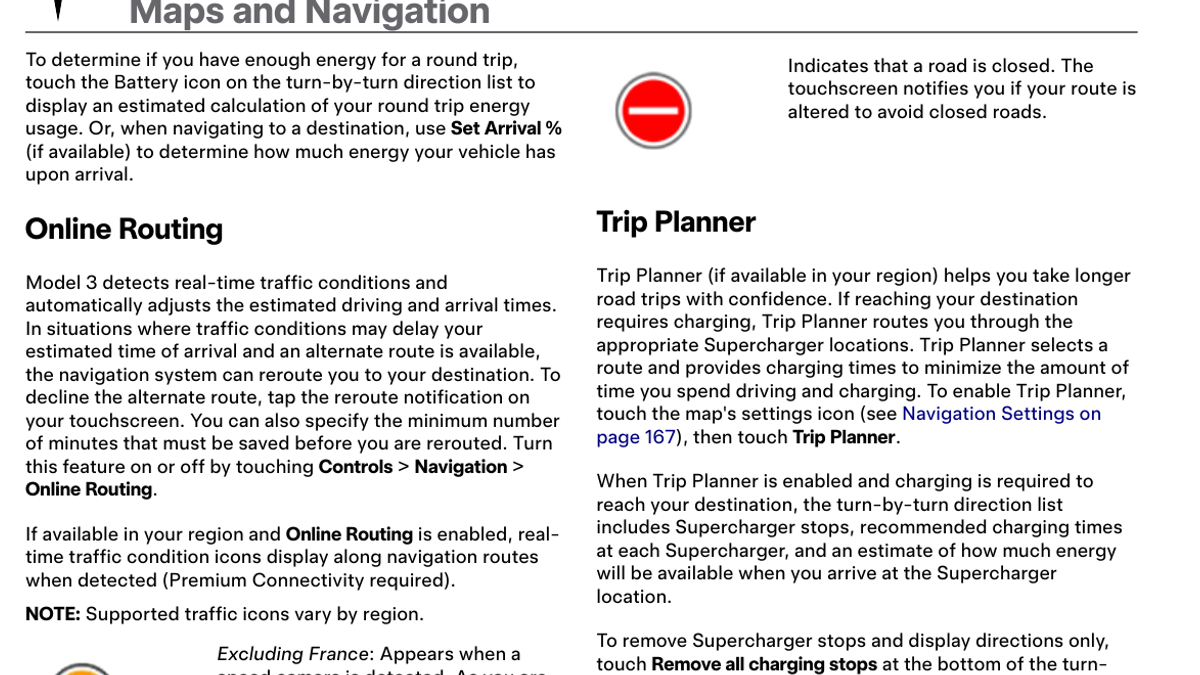
Tesla Trip Planner builds a road-trip route around Supercharger stops, recommended charging times and estimated energy at arrival. Owners can edit stops, monitor Tesla road-trip charging from the app and, where available, use Set Arrival Percentage. The numbers remain estimates, so keep the route active and follow new alerts while driving.
30-Second Brief
- This is a dated owner explainer based on Tesla’s current charging support and a Model 3 Owner’s Manual created June 30, 2026; it does not claim Tesla launched a new feature today.
- Trip Planner adds Supercharger stops when charging is needed and recommends how long to charge at each stop.
- The route estimates battery energy at charging stops and at the destination. Set Arrival Percentage is available only in supported regions and configurations.
- If an owner charges for more or less time than recommended, later charging-time estimates adjust.
- Tesla says the system attempts to reroute when a Supercharger on the active route experiences an outage.
What Happened
Tesla’s current owner documentation describes Trip Planner as the route layer that connects navigation, battery prediction and Supercharger availability. The company’s charging support page recommends using the in-car planner for long trips because its suggested stops and charge times respond to the vehicle and route.
The useful owner distinction is between a route recommendation and a guarantee. Trip Planner continually updates the plan, but predicted energy still depends on driving style, speed, weather, temperature, traffic, elevation and charger conditions.
What Is Confirmed
- Automatic Supercharger stops: Trip Planner adds charging stops when they are needed to reach the destination.
- Charging-time guidance: The route shows recommended time at each Supercharger and estimated energy on arrival.
- Dynamic adjustment: Later stop estimates change when the owner charges for a shorter or longer period.
- Arrival target: Set Arrival Percentage can reserve more energy at the destination where the feature is available.
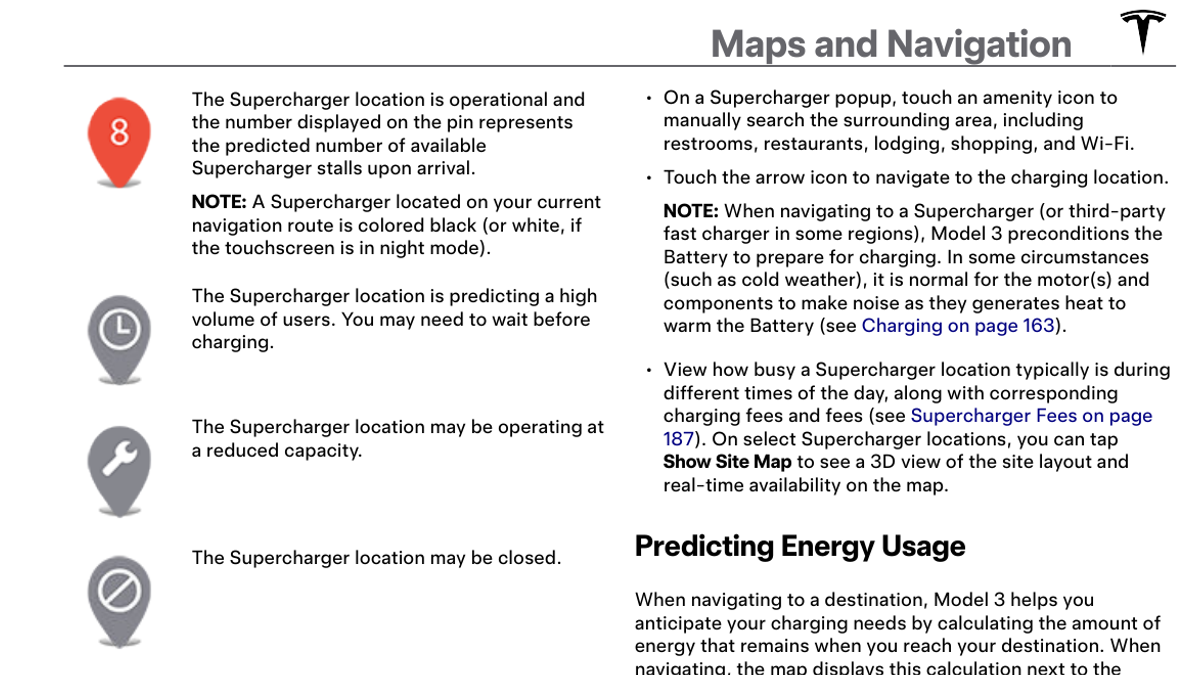
- Charger conditions: The map can show predicted stall availability, high usage, reduced capacity, closure or missing data.
- Outage response: Tesla says Trip Planner notifies the driver and attempts to reroute if an on-route Supercharger experiences an outage.
- Mobile planning: The Tesla app can plan a route, set departure energy, edit charging stops and send the trip to the car.
What Remains Unconfirmed
Tesla does not promise that every Trip Planner feature is available in every market, vehicle or software branch. Set Arrival Percentage, third-party charger display, live traffic and some charger details can vary by region, connectivity and configuration.
An arrival-energy estimate is not a guaranteed state of charge. The manual says predictions incorporate driving behavior and environmental factors and update during the drive. A charger pin is also a predicted status, not a reservation.
Why It Matters
Road-trip charging is fastest when the route treats driving and charging as one problem. A longer stop can reduce a later stop, while charging a high battery more slowly may take more total time than leaving earlier for the next charger. Trip Planner is designed to recalculate that sequence.
Keeping the route active also supports battery preconditioning and outage rerouting. Removing all charging stops may leave the car warning that charging is required, and manually chosen third-party sites may not have the same automatic planning coverage.
What Tesla Owners Should Know
- Enter the complete destination. Let Trip Planner build the charging sequence before changing stops.
- Set departure energy in the app. A realistic starting percentage improves mobile trip planning before the route is sent to the car.
- Use Set Arrival Percentage when available. Reserve extra energy for local driving, cold parking or a destination without reliable charging.
- Read the charger pin. High usage, reduced capacity and closure symbols can justify a route change.
- Watch the in-car remaining-time prompt. The recommended charging time is tied to the next stop or final destination, not necessarily a full charge.
- Keep navigation active. It supports updated energy estimates, battery preparation and outage rerouting.
- Add third-party chargers deliberately. Tesla says Trip Planner does not automatically route to them in all cases, even when they appear on the map.
Tesstudio Analysis
The best way to use Trip Planner is as a live plan rather than a fixed itinerary. Check the arrival-energy estimate before departure, preserve a buffer appropriate to the destination, and let the car recalculate after every charging stop.
Owners should be most cautious when the route depends on one remote charger, severe weather or a near-empty arrival. In those cases, a larger arrival buffer and a manually reviewed alternative charger are more useful than trying to hit the lowest possible percentage.
Related Tesla News Resources
Follow the Tesstudio Tesla News hub for verified Tesla charging and owner updates. No Related Gear placement is included because route-planning guidance does not require an accessory purchase.
Sources & Reporting Notes
- Tesla Support: Charging - official guidance to use Trip Planner for current road-trip stops and charge times.
- Tesla Model 3 Owner’s Manual - official PDF created June 30, 2026; Maps and Navigation on PDF pages 170-174.
- Tesla Model 3 Owner’s Manual: Maps and Navigation - web version covering charger display, energy prediction and Trip Planner.
- Tesla Owner’s Manual: Mobile App - route editing, departure energy and send-to-car guidance.
Reporting note: Operational statements are attributed to Tesla’s current documentation. This explainer does not present the June 30 manual as an August 21 announcement and does not guarantee charger availability or arrival energy.
Update & Correction Log
August 21, 2026: Initial Owner Explainer based on Tesla Support and Tesla owner-manual documentation. Regional availability and estimate limitations are stated explicitly.



Leave a comment
This site is protected by hCaptcha and the hCaptcha Privacy Policy and Terms of Service apply.