
Owner Brief: What Tesla Says About a Stuck Model X Charge Cable
Owner Brief · Current Tesla Instructions

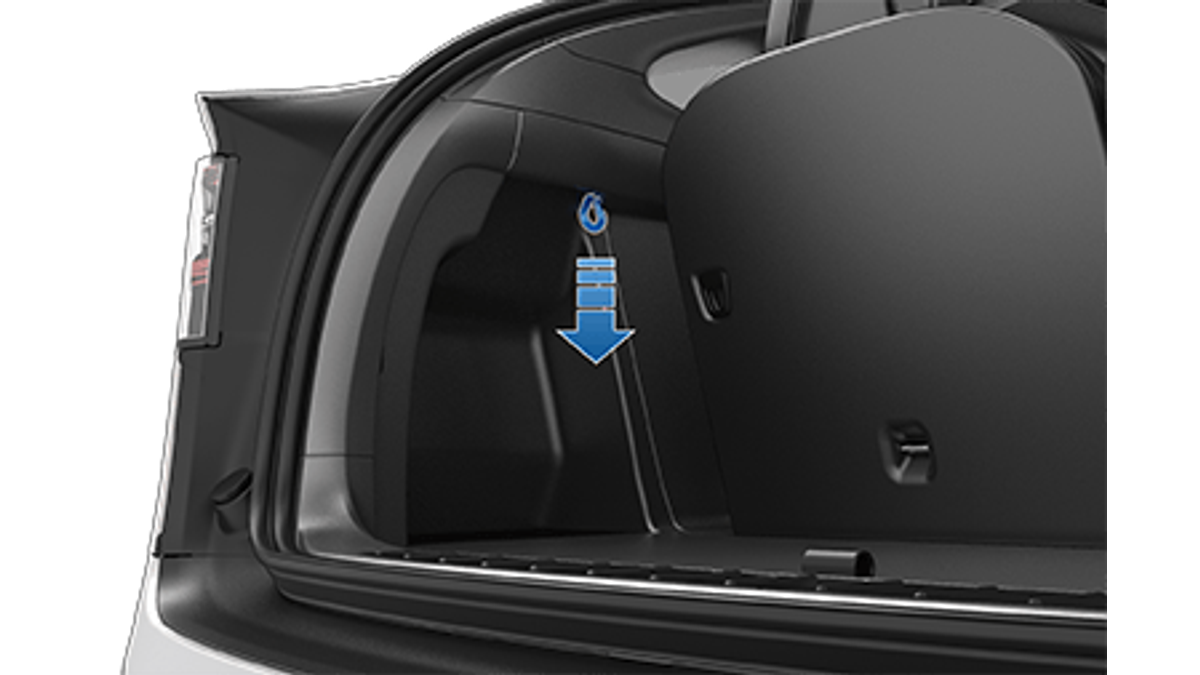
If a Model X charge cable will not release, Tesla says to stop charging first and try the normal touchscreen, mobile-app or charge-handle methods. Use the manual release only if those methods fail. Open the rear trunk, pull the release cable downward, then remove the connector—never pull both at the same time.
30-Second Brief
- This Owner Brief is dated October 25, 2026 in America/Los_Angeles. It summarizes current Tesla Model X guidance and does not claim the procedure changed today.
- Tesla treats the manual release as a last-resort method, not the normal way to unplug.
- Before touching the release cable, confirm the vehicle is not actively charging and use Stop Charging if necessary.
- Tesla directs owners to open the rear trunk and pull the charge-port release cable downward.
- Tesla warns never to pull the release cable while simultaneously trying to remove the connector.
- If orange high-voltage conductors are exposed, Tesla says not to attempt to remove the charge cable.
What Happened
Tesla maintains a directly readable Model X DIY page for manually releasing a charge cable when the usual methods do not work. The page preserves the charging-state warning, last-resort boundary and pull order in one official procedure. This is not a same-day vehicle or software announcement; it is a dated owner explainer built from Tesla’s live guidance.
This brief enters Tesstudio’s mandatory fallback ladder after 5.462 no-publication hours while the October 25, 2026 Los Angeles daily count remains at 1. Same-window items were duplicate, based on unverified social claims or below the hard evidence gate, so the workflow expanded to high-value current owner guidance without presenting it as breaking news.
What Is Confirmed
- Normal release comes first: Tesla says to try the vehicle touchscreen, mobile app or charge-handle button before using the manual cable.
- Charging must be stopped: the vehicle must not be actively charging, and Tesla explicitly warns not to perform the procedure while charging.
- Access is through the rear trunk: Tesla directs owners to open the rear trunk and pull the charge-port release cable downward.
- The sequence matters: release first, then remove the connector. Tesla warns not to pull the release cable and charge cable simultaneously.
- It is a last resort: Tesla says to use the release cable only when the usual release methods fail.
- Visible orange conductors are a stop condition: Tesla warns not to attempt removal when high-voltage conductors are exposed.
What Remains Unconfirmed
The official pages do not identify why a particular connector is stuck. A frozen charge-port latch, interrupted session, handle-button problem, software state or hardware fault can require different next steps; this brief does not diagnose a vehicle.
A successful manual release also does not prove the latch, connector or charge port is healthy. The evidence does not support using the cable routinely, forcing a connector, opening trim beyond the documented access or continuing to charge after visible damage.
Why It Matters
A stuck connector creates pressure to pull harder, but Tesla’s instructions narrow the safe sequence instead: stop charging, exhaust the normal release methods, pull the manual release downward and only then remove the connector. That order reduces the risk of fighting an energized or still-latched connection.
The “last resort” wording matters because the release cable is an emergency access path, not a convenience control. Repeated sticking, unusual heat, damaged pins, exposed conductors or charging alerts should move the situation from unplugging guidance to inspection and service.
What Tesla Owners Should Know
- Verify charging has stopped. Use the touchscreen or app and wait until the session is no longer active.
- Try the standard methods. Use Unlock Charge Port on the touchscreen, the mobile-app control or the charge-handle button when available.
- Open the rear trunk. Follow the live Model X page for the documented release-cable location.
- Pull the release downward. Do not yank the connector at the same moment.
- Remove the connector only after release. Keep the actions separate and controlled.
- Stop if orange conductors are visible. Do not attempt removal; keep clear and contact Tesla support or roadside assistance.
- Do not make it routine. If the same cable repeatedly sticks, preserve any alerts and arrange diagnosis rather than relying on the manual release.
- Escalate when the sequence fails. Do not force the connector or remove trim beyond the documented access; contact Tesla support or roadside assistance.
Tesstudio Analysis
This brief scores 69.8 because it solves a high-intent owner problem with a directly readable Tier 0 Tesla procedure, while keeping the claim narrow. The value is not novelty; it is the preserved safety order and the distinction between a normal control and a last-resort release.
The evidence supports an immediate unplugging sequence, not a fault diagnosis. If the connector will not release after the documented steps, or if there is heat, damage, an exposed conductor or a recurring problem, the prudent next action is Tesla support or roadside assistance.
Related Tesla News Resources
For charge-port preparation on road trips, see Tesstudio’s battery preconditioning guide. If the vehicle cannot be safely recovered, see the Tesla roadside assistance explainer. No Related Gear module is included because the official procedure does not establish an accessory need.
Sources & Reporting Notes
- Tesla Model X DIY — Manually Releasing Charge Cable — primary source for the normal-methods-first rule, stop-charging boundary, release location, pull sequence and exposed-conductor warning.
- Tesla Model X product page — source attribution for the illustrative vehicle-family image only.
Reporting note: The instructional page was read through the project’s approved lightweight verifier before publication. The procedure image is Tesla’s manual asset; the lead visual is a previously verified official configurator image. Community posts were treated only as interest signals and were not used as factual evidence.
Update & Correction Log
October 25, 2026: Initial Owner Brief, published in mandatory fallback mode after more than five no-publication hours and with 1 Tesla News post on the America/Los_Angeles day.




Leave a comment
This site is protected by hCaptcha and the hCaptcha Privacy Policy and Terms of Service apply.