

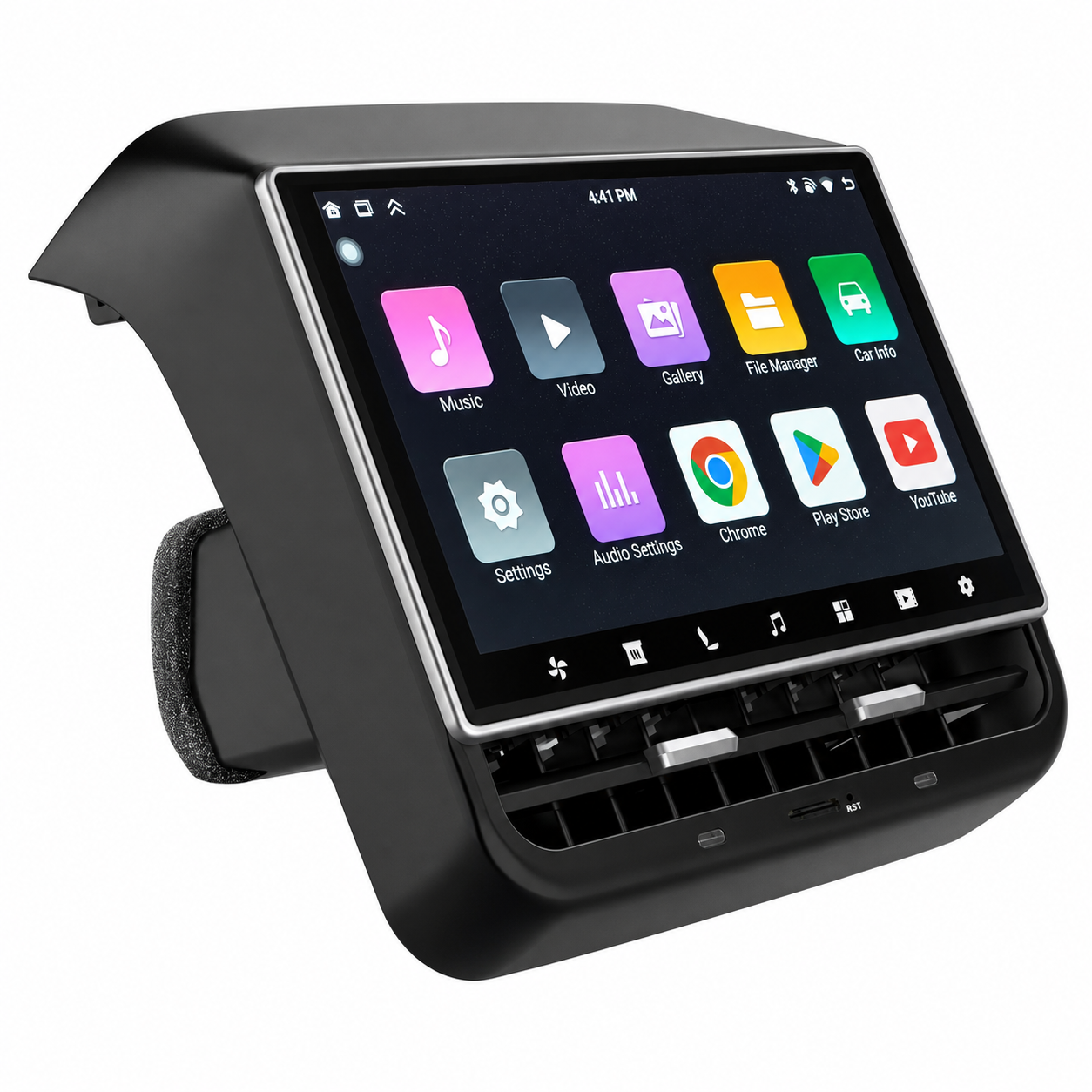
Tesla Dashboard Display Screen - The Complete 2026 Guide for U.S. Owners at Tesstudio
Tesla's decision to remove the traditional driver-facing instrument cluster was bold. Controversial. And for millions of American Tesla owners, genuinely inconvenient. You bought one of the most advanced vehicles on the planet, yet you can't glance down and see your speed without looking sideways at a 15-inch touchscreen. You can't use Apple CarPlay. You don't get a heads-up display. And every time you want to check your battery range, you're taking your eyes off the road.
The good news: there's a clean, plug-and-play fix — and it doesn't require a service center visit, a voided warranty, or a single wire cut.
The Tesla dashboard display screen aftermarket has matured significantly. In 2026, Tesstudio offers the most comprehensive lineup of vehicle-specific dashboard display screens for Tesla Model 3, Model Y, Model 3 Highland, Model Y Juniper, and Cybertruck — 11 distinct products covering every budget, every screen size, and every use case.
This guide covers all of them. We'll explain what a Tesla dashboard display screen actually does, what separates a great one from a mediocre one, and exactly which Tesstudio model is right for your specific Tesla.
👉 Browse the full collection: Tesstudio Dashboard Display Screen Collection
What Is a Tesla Dashboard Display Screen — and Why Do You Need One?
A Tesla dashboard display screen is an aftermarket instrument cluster that mounts directly in front of the driver, in the space between the steering wheel and the windshield. It connects to your Tesla's existing data bus and displays real-time vehicle information — speed, battery level, range, gear position, tire pressure, autopilot status — exactly where your eyes naturally fall while driving.
The best models also add:
- Wireless Apple CarPlay & Android Auto — the #1 feature Tesla owners request
- Active safety alerts — blind spot detection, forward collision warning, speed limit reminders
- Front camera display — eliminates blind spots at low speed
- Standalone entertainment — stream video directly without CarPlay
- OTA firmware updates — your screen improves over time, automatically
The result is a driving experience that feels complete — the way a $50,000+ vehicle should feel from day one.
Why Tesla Doesn't Offer This Natively
Tesla's philosophy is software-first, minimalist hardware. Elon Musk has publicly stated that traditional instrument clusters are unnecessary in a car with a large central display. That's a defensible position — but it ignores the reality that over 80% of U.S. drivers use iPhones, and Apple CarPlay is the single most-requested feature in automotive consumer surveys year after year.
Tesla has shown no signs of adding native CarPlay support. The aftermarket has stepped in to fill that gap — and Tesstudio's Tesla dashboard display screens are the most refined solution available in 2026.
The 5 Things That Separate a Great Tesla Dashboard Display Screen from a Bad One
Not every aftermarket Tesla CarPlay screen is worth your money. Here's the framework for evaluating any option you're considering:
1. Model-Specific Engineering (Not "Universal Fit")
A screen designed for "any car" will never fit, look, or function as well as one engineered specifically for your Tesla. Tesstudio builds separate products for Model 3, Model Y, Model 3 Highland, Model Y Juniper, and Cybertruck — each with custom mounting brackets, OEM-matched connectors, and zero interference with factory functions.
2. Native CAN Bus Data Integration
Your Tesla dashboard display screen should read data directly from your vehicle's CAN bus — the same data network your Tesla uses internally. This is what enables real-time speed, battery percentage, range, gear position, tire pressure, and autopilot status display. Without CAN bus integration, you're just looking at a tablet.
3. Wireless CarPlay — Not Wired
Wired CarPlay requires a cable every time you get in the car. In 2026, that's unacceptable. Every Tesstudio Tesla CarPlay screen supports fully wireless Apple CarPlay and Android Auto — pair once, connect automatically forever.
4. Stable Operating System with OTA Updates
Linux-based systems (used in most Tesstudio screens) offer automotive-grade stability — no freezes, no crashes, no lag. Android-based systems (like the 10.25" 4G model) offer more app flexibility and 4G connectivity. Both support over-the-air firmware updates, so your screen gets better over time without manual intervention.
5. True Plug-and-Play Installation
No drilling. No wire cutting. No permanent modifications. The best Tesla dashboard screen upgrades install in 15–20 minutes using your Tesla's existing harness and a custom bracket. Every Tesstudio screen meets this standard — and every installation is fully reversible.
Every Tesstudio Dashboard Display Screen, Reviewed
Here's a complete breakdown of all 11 models in the Tesstudio Dashboard Display Screen collection — what each one does, who it's for, and what makes it stand out.

F88 — 8.8" Touch Screen Instrument Cluster
Compatible: Model 3 (2017+), Model Y (2020–2023), Model 3 Highland, Model Y Juniper | Price: $265–$337
The F88 is one of Tesstudio's top-selling Tesla dashboard display screens — and it earns that status. The 8.8-inch ultra-thin IPS touchscreen with a 3mm bezel looks factory-installed. A high-performance Linux OS ensures freeze-free operation. Wireless CarPlay, CarLife, Android Auto, and Hi Car are all supported. The hidden air vent design maintains airflow from the bottom of the unit. Syncs with your Tesla's front camera and native display. Split-screen functionality for multitasking. Original scroll wheel and touchscreen control both work natively.
F9 Pro — 2026 Flagship CarPlay Screen
Compatible: Model 3 Highland, Model Y Juniper, Model 3, Model Y | Price: $368–$391
The F9 Pro is Tesstudio's 2026 flagship Tesla CarPlay dashboard display. Engineered specifically for the latest Highland and Juniper models, it delivers a 9-inch HD display, seamless wireless Apple CarPlay integration, and an OEM-grade fit that maintains your Tesla's premium interior aesthetic. If you own a 2024+ Model 3 Highland or Model Y Juniper and want the most current, most capable Tesla dashboard screen upgrade available, this is the definitive answer.

TES-F10C — 10.88" Heads-Up Display
Compatible: Model 3, Model Y, Model 3 Highland, Model Y Juniper | Price: $469–$512
The TES-F10C is the most immersive Tesla heads-up display in the Tesstudio lineup. At 10.88 inches with 1920×532 resolution and a narrow bezel, it delivers an expanded viewing area that puts more critical information in your direct line of sight than any other screen in the collection. Key differentiators: new multi-directional vent adjustment (up/down/left/right), standalone screen casting for movies and shows without CarPlay, three UI themes (Futuristic Tech / Classic / Factory), five Tesla 3D model options, and multi-language support. For drivers who want the most complete Tesla dashboard display screen experience, the TES-F10C is the benchmark.
TES-C10 — 10.88" Dashboard for Cybertruck
Compatible: Tesla Cybertruck | Price: $469
Cybertruck owners have a dedicated solution. The TES-C10 features a 10.88" HD display (1920×532 resolution) showing speed, battery, and tire pressure in real time. A streamlined single-module design cuts installation time by one-third compared to previous-generation screens. Adjustable multi-directional air vents maintain Cybertruck's interior airflow. A high-performance chip ensures smooth, lag-free operation even under demanding conditions. Built as tough as the truck it's designed for.

F96C — CarPlay Dashboard Touchscreen with Active Safety
Compatible: Model 3, Model Y, Model 3 Highland, Model Y Juniper | Price: $250–$348
The F96C is the safety-first Tesla dashboard display screen in the lineup — and it's the most feature-rich option at its price point. In addition to wireless CarPlay and Android Auto, it delivers a full suite of active safety alerts: oncoming-vehicle warning, blind-spot detection, forward-collision warning, autopilot status alerts, and speed-limit reminders. Five customizable UI themes. Remote OTA updates. An intuitive drop-down menu gives you one-tap access to screen toggle, volume, brightness, auto-sync, door release (RF/LR/RR), battery preheat, Boss Key passenger seat adjust, AP Do-Not-Disturb mode, digital clock, camera, and steering wheel shortcuts. This is the most complete daily-driver Tesla CarPlay screen in the collection.
FY9C Pro — Curved Screen Premium Dashboard
Compatible: Model 3, Model Y, Model 3 Highland, Model Y Juniper | Price: $461–$750
The FY9C Pro brings a premium curved-screen aesthetic to the Tesla dashboard display screen category. An 8.9-inch HD curved display on a Linux platform delivers clear, distortion-free visuals without blocking the windshield. Adaptive day and night modes ensure optimal visibility in all lighting conditions. Supports both wired and wireless CarPlay/Android Auto. Real-time driving data display. For Tesla owners who prioritize aesthetics alongside functionality, the FY9C Pro is the premium choice.
F62 Plus — 6.2" Linux Dashboard for Model 3 Highland
Compatible: Model 3 Highland | Price: $65–$136
The F62 Plus is the best-value Tesla dashboard display screen in the entire Tesstudio lineup — and it punches well above its price point. A 6.2-inch HD 2.5D IPS screen (960×360P) on a Linux OS delivers crisp, vibrant visuals. Wireless CarPlay and Android Auto. Blind spot warnings. Tire pressure display. Charging reminders. OTA Bluetooth updates. Five car model color options (white, red, black, blue, gray). Three UI themes: Minimalist, Classic, Sporty. Adaptive day/night brightness. Original steering wheel button control. Autopilot and Plaid mode icon sync. For Model 3 Highland owners who want a clean, capable upgrade without a premium price tag, the F62 Plus is the obvious starting point.
F63 — CarPlay Dashboard Display (Best Seller)
Compatible: Model 3, Model Y, Model 3 Highland | Price: $141
The F63 is Tesstudio's best-selling Tesla CarPlay dashboard display — the proven, reliable choice for owners who want wireless CarPlay, a quality display, and a straightforward installation without complexity or compromise. A 6.25-inch HD screen (1560×720 resolution) delivers sharp, clear visuals. Front camera integration addresses blind spots. Real-time vehicle data sync covers speed, gear, battery, and more. Damage-free installation preserves all original Tesla functions including heating. At $141, the F63 offers the best combination of capability and value in the lineup.

C9 Dashscreen — 9" Curved Display for Cybertruck
Compatible: Tesla Cybertruck | Price: $306–$421
The C9 is Tesstudio's original Cybertruck-specific dashboard display screen. A 9-inch 2.5D curved HD display (1920×720P, 900 nits brightness, 1000:1 contrast ratio) delivers vivid, sunlight-readable visuals from wide viewing angles — both driver and passenger can see clearly. Real-time vehicle data display shows speed, battery level, range, and tire pressure with greater detail than the stock screen. Smart CarPlay navigation provides real-time traffic, turn-by-turn directions, and optimized routing for city and off-road driving. Custom-designed to match Cybertruck's interior style with zero impact on airflow or original functions. Advanced processors deliver zero-lag real-time responsiveness. Tested to resist vibrations, bumps, and extreme temperatures.
F68 Pro — 6.86" Front Dashboard Screen
Compatible: Model 3, Model Y, Model 3 Highland, Model Y Juniper | Price: $241–$265
The F68 Pro is powered by Linux with a 6.86-inch HD 2.5D fully laminated screen (1240×480P resolution). Two UI theme styles. Adaptive day/night mode. Original steering wheel control support. Five car model color options. Front view camera integration. Wireless CarPlay and Android Auto. Blind spot detection. OTA updates. Comprehensive real-time data display covering speed, battery level, mileage, and power consumption. A well-rounded mid-range Tesla dashboard display screen that covers all the essentials without compromise.
10.25" Android 4G Instrument Cluster — The Powerhouse
Compatible: Model 3 (2016–2022+), Model Y (2020–2022+) — Intel Atom & AMD Ryzen | Price: $350
The 10.25" Android 4G is the most technically capable Tesla instrument cluster display in the Tesstudio lineup. Android 12.0. Octa-core CPU. 4GB RAM. 64GB ROM. 4G LTE connectivity for OTA updates without Wi-Fi dependency. A 10.25-inch ultra-thin IPS touchscreen (1920×720 resolution) with a high screen-to-body ratio and minimal bezel integrates seamlessly into your Tesla's interior. Anti-blue light technology reduces eye strain on long drives. Automatic sync with your Tesla's central control screen covers speed, gear, charge status, light status, door information, safety distance, speed limit warnings, and tire pressure warnings. For owners who want maximum processing power and Android app flexibility in their Tesla dashboard display screen, this is the top-of-class choice.
Side-by-Side Comparison: Which Tesla Dashboard Display Screen is Right for You?
| Model | Screen Size | OS | CarPlay | Best For | Price |
|---|---|---|---|---|---|
| F62 Plus | 6.2" | Linux | Wireless | Model 3 Highland — best value | $65–$136 |
| F63 | 6.25" | Linux | Wireless | Model 3/Y — best seller | $141 |
| F68 Pro | 6.86" | Linux | Wireless | Model 3/Y/Highland/Juniper — mid-range | $241–$265 |
| F96C | — | Linux | Wireless | Safety-focused daily driver | $250–$348 |
| F88 | 8.8" | Linux | Wireless | Model 3/Y — premium look | $265–$337 |
| 10.25" Android | 10.25" | Android 12 | Wireless | Model 3/Y — max power | $350 |
| C9 | 9" | Linux | Wireless | Cybertruck | $306–$421 |
| F9 Pro | 9" | Linux | Wireless | Highland/Juniper — 2026 flagship | $368–$391 |
| FY9C Pro | 8.9" curved | Linux | Wired + Wireless | Premium aesthetics | $461–$750 |
| TES-F10C | 10.88" | Linux | Wireless | Max screen / HUD experience | $469–$512 |
| TES-C10 | 10.88" | Linux | Wireless | Cybertruck — premium | $469 |
What Real U.S. Tesla Owners Are Saying
⭐⭐⭐⭐⭐ — Marcus D., Austin TX | Model Y Juniper Owner
"I've been wanting CarPlay in my Model Y since day one. The F9 Pro was exactly what I needed — wireless CarPlay, perfect fit, looks factory. Installed in 15 minutes. The real-time speed and battery display right in front of me is a genuine safety improvement. I can't imagine going back to the stock setup."
⭐⭐⭐⭐⭐ — Jennifer R., Denver CO | Model 3 Highland Owner
"The TES-F10C is stunning. 10.88 inches of speed, battery, navigation, and autopilot status right in my line of sight. The Futuristic Tech UI theme matches my Model 3's interior perfectly. Zero issues after 4 months of daily use in Colorado weather. Tesstudio's build quality is genuinely impressive."
Installation: What to Expect

Every Tesstudio Tesla dashboard display screen is designed for DIY installation. Here's what the process looks like:
- Remove the existing trim panel in the driver's dashboard area — no tools required on most models, just firm pressure.
- Connect the plug-and-play harness to your Tesla's existing connector — no wire cutting, no splicing.
- Mount the custom bracket — model-specific fit, no drilling, no adhesive.
- Seat the screen into the bracket and power on.
- Pair your iPhone or Android via the CarPlay/Android Auto setup — takes about 60 seconds.
Total time: 15–20 minutes. Every product includes a detailed installation manual and a QR code linking to a video walkthrough. If you run into any questions, Tesstudio's support team is available to assist.
💡 U.S. Shipping Note: Tesstudio ships from Canadian warehouses with fast cross-border delivery to U.S. Most orders arrive in 3–7 business days. All screens are configured for left-hand drive (standard U.S.) vehicles.
The U.S. Tesla Dashboard Display Screen Market in 2026
Understanding why this product category matters requires understanding the U.S. Tesla market specifically. As of 2026, the United States accounts for the largest concentration of Tesla vehicles globally. Model 3 and Model Y together represent the two best-selling electric vehicles in American history.
Three converging trends are driving demand for Tesla dashboard display screens in the U.S. specifically:
- iOS dominance: 57% of U.S. smartphone users are on iPhone as of 2026. Apple CarPlay is the most-requested in-car feature in every major automotive consumer survey. Tesla's refusal to support it natively creates a clear, addressable gap.
- Safety awareness: NHTSA data consistently shows that eyes-off-road time is a primary factor in distracted driving incidents. A dedicated Tesla instrument cluster display keeps critical data in the driver's natural line of sight — reducing the need to glance sideways at the central screen.
- Longer ownership cycles: As Tesla vehicles age out of warranty, owners are more willing to invest in aftermarket upgrades that improve daily usability. The Tesla dashboard display screen category benefits directly from this trend.
Tesstudio's position as a Tesla-specialist brand — with products engineered specifically for Tesla models rather than adapted from generic automotive solutions — makes it the natural choice for U.S. owners who want a solution that actually fits, functions, and lasts.
🛒 Shop All Tesla Dashboard Display Screens
Frequently Asked Questions About Tesla Dashboard Display Screens
Q1: Will adding a dashboard display screen void my Tesla warranty?
No. Every Tesstudio Tesla dashboard display screen is a plug-and-play, non-destructive upgrade that connects to your Tesla's existing harness without cutting, splicing, or modifying any factory wiring. Under the Magnuson-Moss Warranty Act — U.S. federal law — a manufacturer cannot void your warranty simply because you've installed an aftermarket accessory that doesn't cause damage. All Tesstudio screens are fully reversible: remove them anytime and your Tesla returns to factory condition.
Q2: Does the Tesla dashboard display screen support Apple CarPlay wirelessly?
Yes. All Tesstudio Tesla CarPlay screens support fully wireless Apple CarPlay — no cable, no dongle. Pair your iPhone once via Bluetooth/Wi-Fi during initial setup, and the connection is automatic every time you get in the car. You'll have full access to Apple Maps, Google Maps, Waze, Spotify, Apple Music, Messages, Phone, and all CarPlay-compatible apps directly on your Tesla dashboard display screen.
Q3: Which dashboard display screen fits my Tesla Model Y Juniper or Model 3 Highland?
Multiple Tesstudio screens are engineered for the latest Highland and Juniper models. The F9 Pro is the 2026 flagship specifically designed for these vehicles. The F88, F96C, FY9C Pro, F68 Pro, and Dashboard Screen CarPlay are also compatible. The F62 Plus is designed exclusively for Model 3 Highland. Always verify your exact build year and trim on the product page before purchasing.
Q4: Can the dashboard display screen show Tesla Autopilot and FSD status?
Yes. Every Tesstudio Tesla dashboard display screen syncs with your vehicle's CAN bus and displays autopilot status icons in real time. The F96C additionally provides active safety alerts including blind-spot detection, forward-collision warning, and speed-limit reminders that complement Tesla's Autopilot system. The plug-and-play installation has zero impact on Tesla's sensor suite, camera systems, or driver assistance software — Autopilot and FSD remain fully functional.
Q5: What's the difference between Linux-based and Android-based Tesla dashboard screens?
Linux-based screens (F62 Plus, F63, F68 Pro, F88, F96C, FY9C Pro, TES-F10C, F9 Pro, C9, TES-C10) offer automotive-grade stability — optimized specifically for in-vehicle use with fast boot times, no background app interference, and consistent performance. The Android 4G model (10.25") runs Android 12.0 with an octa-core CPU, 4GB RAM, 64GB ROM, and 4G LTE connectivity — offering more app flexibility and independent internet access. For most drivers, Linux is the better choice. For tech-forward users who want Android app access and 4G independence, the Android model is worth the premium.
Q6: How does Tesstudio's dashboard display screen compare to other brands?
The key differentiator is Tesla-specific engineering. Generic aftermarket screens are adapted from universal automotive solutions — they may fit imperfectly, interfere with factory functions, or lack proper CAN bus integration. Tesstudio builds each Tesla dashboard display screen specifically for its target model, with custom brackets, OEM-matched connectors, and verified compatibility with Tesla's factory systems. The result is a screen that looks factory-installed, functions reliably, and doesn't compromise any original vehicle capability. Tesstudio also provides model-specific installation guides, video walkthroughs, and dedicated support — not generic documentation.
Have a question about compatibility or need help choosing the right Tesla dashboard display screen for your model? Contact the Tesstudio team — we respond fast and know Tesla accessories inside out.


Leave a comment
This site is protected by hCaptcha and the hCaptcha Privacy Policy and Terms of Service apply.