
Owner Explainer: Powerwall Backup Reserve, Storm Watch and Outage Prep
Owner Explainer · Current Tesla Guidance
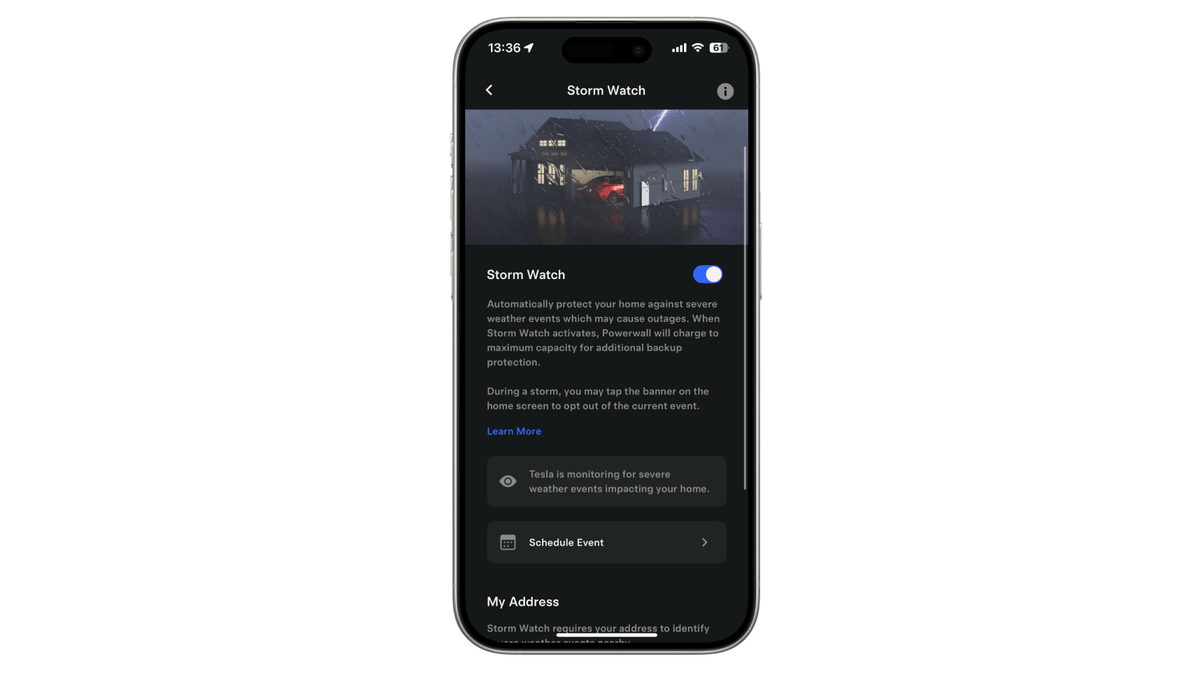
Set Powerwall Backup Reserve around the outage protection you actually need, then choose Self-Powered or Savings behavior for the remaining energy. Tesla Storm Watch can charge Powerwall to maximum capacity for qualifying severe-weather alerts, but it does not cover every outage. During an outage, reduce energy-intensive loads and monitor remaining charge in the Tesla app.
30-Second Brief
- This Owner Explainer is dated September 28, 2026 in America/Los_Angeles and summarizes current Tesla documentation. It does not present Backup Reserve or Storm Watch as newly announced today.
- Backup Reserve saves a chosen portion of stored energy for grid outages. The rest is available to Self-Powered or Savings operation.
- Tesla warns that setting reserve below 20% triggers a low-reserve indicator and may leave too little energy for an extended outage.
- Storm Watch can prioritize charging to maximum capacity when specified severe-weather alerts affect the home's configured location; it returns the system to normal behavior when the event ends.
- Storm Watch may not activate for planned outages, ordinary weather or other grid instability. Owners who want more protection should raise Backup Reserve in advance.
- Runtime depends on stored energy, live household demand, solar conditions and system design—not on a universal number of hours.
What Happened
Tesla's current Powerwall support pages split outage preparation into two layers. Backup Reserve is the owner's standing allocation of stored energy for outages. Storm Watch is an event-driven mode that can temporarily prioritize charging when Tesla recognizes a qualifying severe-weather alert for the system's home location.
The distinction matters because the two settings solve different problems. Reserve is a day-to-day tradeoff between backup protection and energy optimization. Storm Watch is a conditional response to named alert types, not a promise to predict every outage.
What Is Confirmed
- Reserve behavior: Tesla says the reserve becomes available during an outage and Powerwall may discharge below the selected percentage while supporting the home.
- Recovery priority: after grid power returns, Powerwall prioritizes charging back above the reserve before resuming normal operation.
- Low-reserve boundaries: Tesla documents a warning below 20%; its Backup Reserve page also describes protective behavior when an outage starts below 5%.
- Storm Watch trigger: Tesla lists specific severe-weather watches and warnings and says the feature charges to maximum capacity when activated.
- Manual preparation: Tesla's current Storm Watch page documents a Schedule Event option, subject to phone pairing and Grid Charging availability.
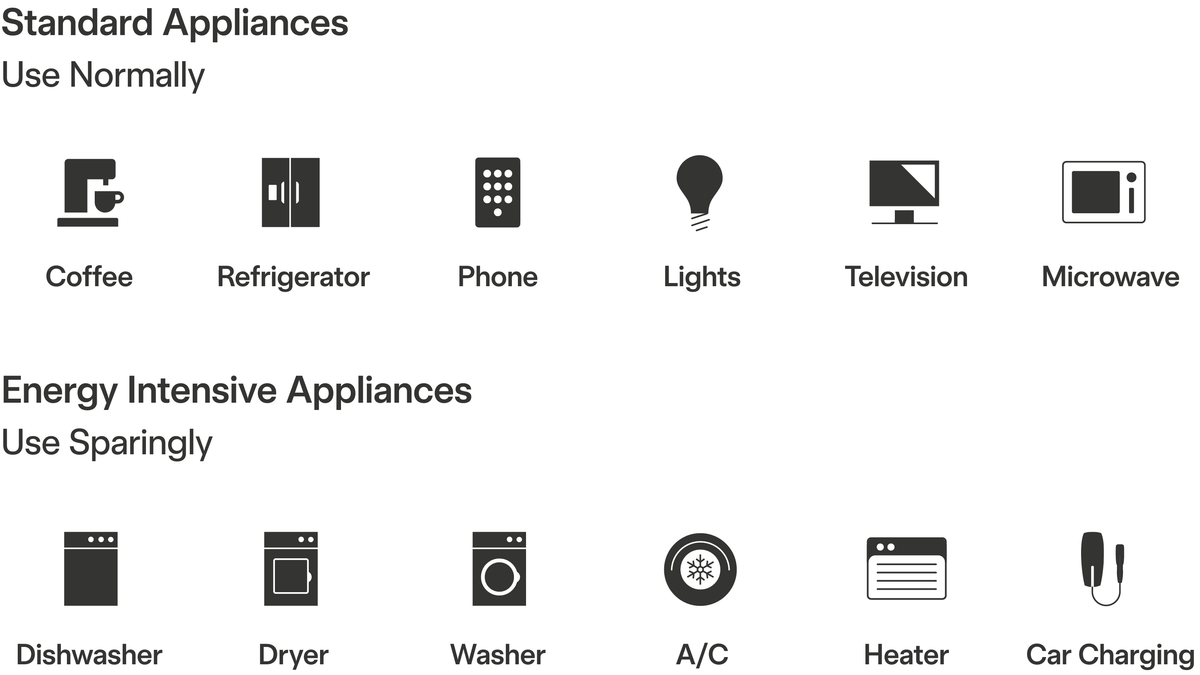
- Load management: Tesla advises limiting air conditioners, vehicle charging, electric heaters, dishwashers and other high-demand equipment during an outage.
- Standby behavior: Tesla's outage guide says Powerwall can enter standby below 10% remaining energy and may attempt solar recharge during specified daytime intervals when paired with solar.
What Remains Unconfirmed
The sources do not provide one correct reserve percentage for every household. The right setting depends on outage history, medical or refrigeration needs, solar production, utility rates, usable system capacity and the power draw of the backed-up circuits.
Storm Watch does not guarantee a full battery before every outage, and it does not prove that every weather alert will trigger the mode. Grid Charging availability can depend on installer settings, market rules and system configuration. Owners should use the controls visible in their own Tesla app and contact their installer or Tesla support when expected settings are absent.
Why It Matters
A low reserve can improve daily solar self-consumption or rate optimization, but it leaves less stored energy ready when an unexpected outage begins. A high reserve improves preparedness while reducing the energy available for daily cycling. Treating Storm Watch as a replacement for that decision can create a false sense of security.
The other half of outage planning is demand. A Powerwall can have plenty of energy remaining and still trip if simultaneous loads exceed the system's power capability. Reducing large loads protects both runtime and stability.
What Tesla Owners Should Know
- List essential loads. Identify refrigeration, communications, medical equipment, lighting, pumps and minimum heating or cooling needs.
- Review recent outages. Use local duration and seasonality—not a generic internet percentage—to choose a reserve starting point.
- Verify Storm Watch. Confirm the toggle is enabled, phone pairing is complete and the home address and map pin are accurate.
- Prepare for non-weather outages. Raise Backup Reserve manually when a planned outage, wildfire shutoff or other grid risk may not match a Storm Watch trigger.
- Cut large loads early. Pause EV charging, electric resistance heat, dryers, dishwashers and other energy-intensive equipment unless system capacity clearly supports them.
- Monitor charge and power. Remaining percentage shows energy; the live flow screen helps reveal whether current demand is draining the system too quickly.
- Preserve solar recovery. During a long outage, keep daytime loads low enough that solar can serve the home and recharge Powerwall.
- Use official support for faults. Follow Tesla's current restart and service steps rather than repeatedly power-cycling equipment without diagnosis.
Tesstudio Analysis
Tesstudio scores this dated Owner Explainer at 73.0. Its operational claims come from current Tesla primary documentation; Tesla's Fleet API page independently exposes the named energy operating modes, while two official support images document the app and outage-load guidance. The score remains below the normal new-fact threshold because there is no same-window product announcement.
The practical takeaway is to use three layers: a household-specific reserve, Storm Watch as additional automation, and an outage load plan. No one layer substitutes for the others.
Sources & Reporting Notes
- Tesla Support: Backup Reserve — primary source for reserve allocation, low-reserve indicators and recovery behavior.
- Tesla Support: Storm Watch — primary source for qualifying alerts, maximum charging, scheduling, address checks and opt-out behavior.
- Tesla Support: Best Practices During Power Outages — primary source for load management, standby, solar recharge and restart boundaries.
- Tesla Fleet API: Energy Endpoints — directly readable primary technical documentation for Powerwall modes and settings.
Reporting note: Direct requests to the three Tesla Support pages returned HTTP 403 during this run, but their current content was readable through the search index on September 28 UTC; the Tesla Fleet API page and both official Tesla image assets returned HTTP 200 directly. Community discussions were used only to identify owner confusion and were not used as factual evidence.
Update & Correction Log
September 28, 2026: Initial publication in mandatory fallback mode after more than six no-publication hours and with zero Tesla News posts on the America/Los_Angeles day. The article preserves the existing-documentation date boundary and makes no new-feature claim.


コメントを書く
このサイトはhCaptchaによって保護されており、hCaptchaプライバシーポリシーおよび利用規約が適用されます。