
Owner Explainer: How Tesla Charging Billing Verification Works
Owner Explainer · Tesla Primary Documentation + German Metrology Context
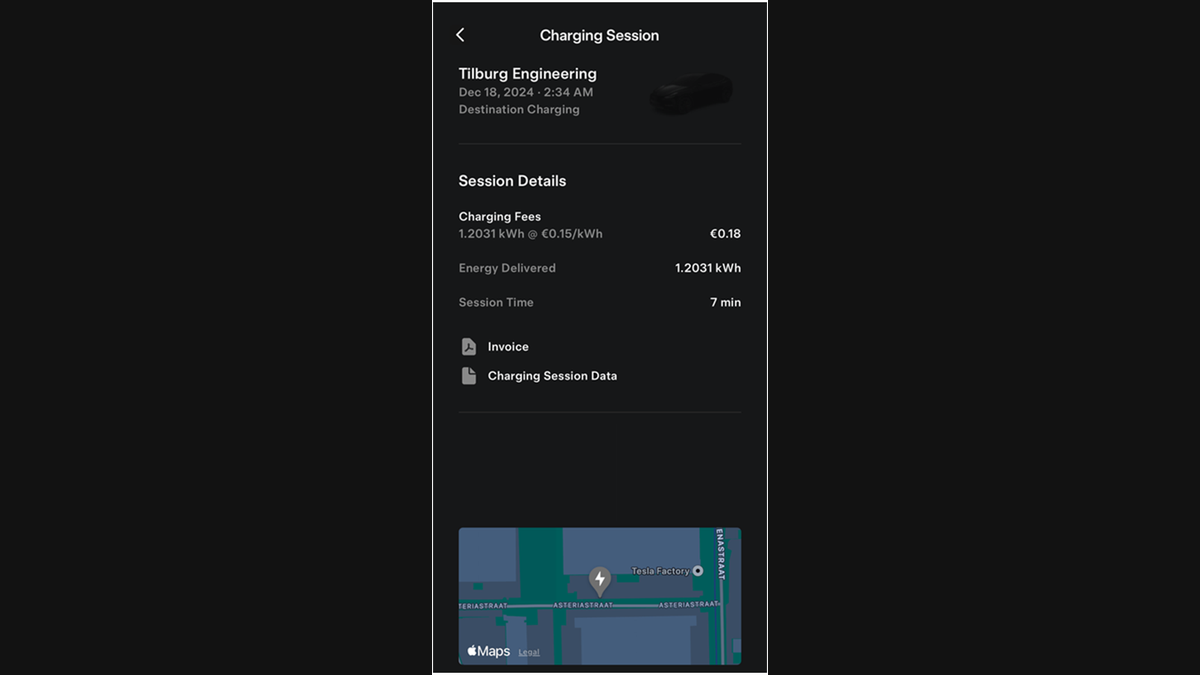
For an eligible Tesla charging billing record, download the Charging Session Data CSV from the Tesla app, upload it to Tesla’s Charging Transparency Software and run the digital-signature check. A successful result supports that the signed meter record was not altered; it does not independently confirm the tariff or invoice calculation.
30-Second Brief
- This Owner Explainer is dated August 25, 2026 in America/Los_Angeles. It summarizes current documentation and does not claim the verification tool launched today.
- Tesla documents signed billing records for eligible Wall Connector 3 MID charging sessions and shows both an invoice and a Charging Session Data file in the Tesla app.
- Tesla’s web tool accepts the data file and checks its digital signature against a charger public key.
- A valid result supports authenticity and data integrity. It does not, by itself, prove the charging rate, taxes, fees or payment total are correct.
- This workflow is region- and hardware-specific. Do not assume every Supercharger, Wall Connector or market exposes the same files.
What Happened
Tesla maintains a charging transparency tool and a Wall Connector 3 MID manual that together document how an eligible customer can check a signed charging meter record. The manual says billed sessions provide an invoice and a separate data file in the Tesla app’s charge history.
This is a current owner explainer, not a claim of a new product launch. Its purpose is to distinguish two questions that are often mixed together: whether the signed meter data are authentic, and whether the final bill used the expected commercial terms.
What Is Confirmed
- Signed record: Tesla’s MID manual says the Wall Connector exports a digitally signed billing record at the end of an eligible session.
- Two downloads: The same manual shows an invoice and a Charging Session Data file in the Tesla app’s charging-session view.
- Verification input: Tesla instructs the customer to upload the Charge Session Data file to its transparency software.
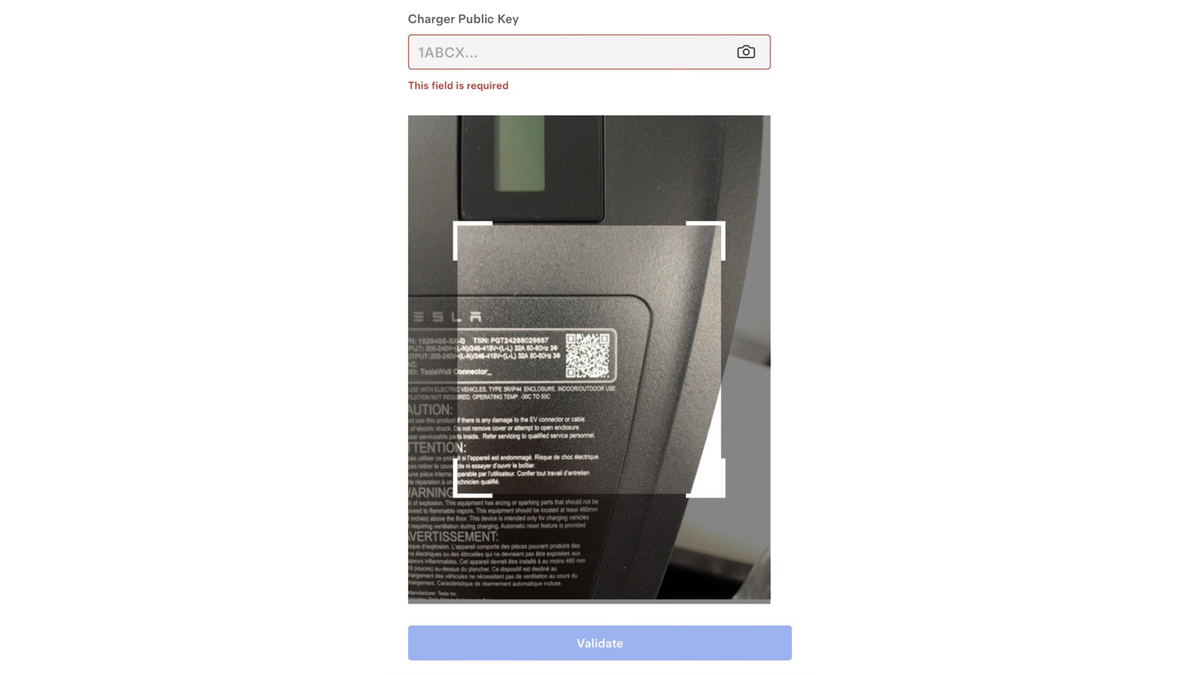
- Public key: Tesla says the file can prefill the key; the manual also shows an optional manual entry or QR-code scan.
- Regulatory context: Germany’s PTB explains that validated transparency software is used to inspect metered EV-charging values, while Bundesnetzagentur explains how charger public keys support checking remotely read values.
What Remains Unconfirmed
The documentation does not establish that every Tesla charging product, session type or country provides the same signed record. The detailed workflow is documented for Wall Connector 3 MID and metrology contexts where signed billing data and public keys apply.
A successful signature check does not independently validate the advertised price, time band, tax treatment, congestion fee, payment method or final arithmetic on an invoice. A failed check also does not automatically prove fraud, a faulty charger or refund eligibility; file selection, format, key matching and support review may be required.
Why It Matters
Digital signatures make a narrow but useful claim testable: whether the meter record is authentic and unchanged. That gives an owner evidence beyond a screenshot when reviewing an eligible billed session.
Separating integrity from pricing also improves dispute handling. The signed record can support the energy and session facts, while the invoice and the rate shown for the location address the commercial calculation.
What Tesla Owners Should Know
- Confirm eligibility. Look for both Invoice and Charging Session Data in the relevant Tesla app charge-history entry. If the data file is absent, do not assume this MID workflow applies.
- Save the original files. Keep the invoice and CSV unchanged. Work from a copy if you need to inspect the text.
- Open Tesla’s tool directly. Use tesla.com/charging/verify; avoid uploading billing records to an unknown third-party validator.
- Upload and validate. Select the Charging Session Data file. If the public key is not populated, follow the manual’s supported entry or QR-scan path.
- Read the result narrowly. A pass supports signed-record authenticity. Compare energy, time and session identifiers with the invoice separately.
- Document any mismatch. Preserve the files, result and relevant app screens, then contact the operator or Tesla through the applicable support channel.
- Protect account data. Charging records can contain location, time and equipment identifiers. Do not post an unredacted file in a public forum.
Tesstudio Analysis
The most useful way to audit a charge is a three-part check: validate the signed record, compare its energy and time fields with the invoice, then compare the invoice rate and fees with what the app displayed for the session.
That sequence avoids overclaiming. Cryptographic verification can show that a signed record is intact, but it cannot decide every billing-policy question. Owners should preserve the original evidence and ask the billing operator to explain any remaining difference.
Related Tesla News Resources
Follow the Tesstudio Tesla News hub for verified Tesla charging and owner guidance. No Related Gear placement is included because billing-record verification does not establish an accessory need.
Sources & Reporting Notes
- Tesla: Charging Transparency Software — primary verification interface and explanation of signed meter-record authenticity.
- Tesla Energy Library: Wall Connector 3 MID billing process — primary workflow, charge-history files, public-key instructions and both attributed images.
- Physikalisch-Technische Bundesanstalt: Transparency software for EV charging — German federal metrology context for validated transparency software.
- Bundesnetzagentur: E-mobility FAQ and charger public keys — German federal network regulator explanation of public keys used to check remotely read meter values.
Reporting note: Tesla product behavior is attributed to Tesla’s current documentation. German agencies provide regulatory and metrology context; they do not endorse Tesstudio. Scope is limited to eligible signed records, especially the documented Wall Connector 3 MID workflow.
Update & Correction Log
August 25, 2026: Initial Owner Explainer, published in mandatory fallback mode after the prior six consecutive no-publication runs and with zero Tesla News articles yet published on the new America/Los_Angeles day.


Hinterlasse einen Kommentar
Diese Website ist durch hCaptcha geschützt und es gelten die allgemeinen Geschäftsbedingungen und Datenschutzbestimmungen von hCaptcha.